

Build summaries
Once every test run on a build has finished, Semaloop writes a short summary of how that build did compared with the one before it. It appears at the top of the build page, under Build summary, and in the build’s Slack message if you’ve connected a channel.
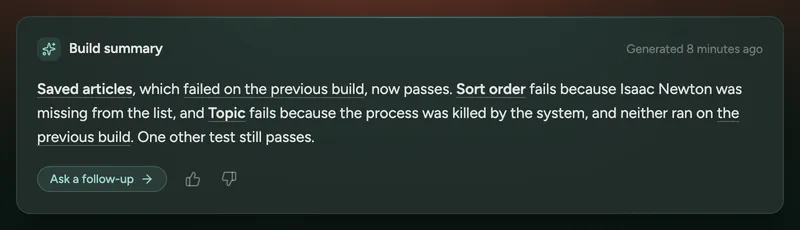
What a summary covers
Section titled “What a summary covers”A summary is a few sentences, rather than a full report. It leads with what changed: tests that passed on the previous build and now fail, or that failed and now pass. Each is linked to the test run, along with a short reason. Tests that were already failing get a brief mention, and the summary ends with how many other tests still pass, or how many didn’t run.
It leaves out tests that passed on both builds, and draft tests. If nothing changed, it says so in one sentence. On your first build, with nothing to compare against, it names the tests that failed.
A run that couldn’t finish because of a problem on Semaloop’s side, rather than in your app, is described as not completed, not as a failure.
When it’s written
Section titled “When it’s written”The summary is written after the last run on the build finishes, once the root cause analysis for any failures is ready. This usually takes a few minutes, and the build page shows “Every run has finished. Writing this build’s summary…” in the meantime. While runs are still in progress, there’s no summary.
If the build’s results change later, for example because you rerun a test or edit a spec, the summary is rewritten to match.
In Slack
Section titled “In Slack”When a Slack channel is connected, the build’s message waits for the summary, so the first notification you get already includes it. Below the summary, the message lists the failing tests, with buttons to View build and Ask a follow-up. When the summary is rewritten, the message updates in place.
Following up
Section titled “Following up”To dig into anything a summary mentions, click Ask a follow-up to open Ask, where you can ask about the build’s results in natural language.
Use the thumbs up and down on the build page to tell us whether a summary was right. A thumbs down asks what was wrong with it; the comment is optional.