

Test authoring basics
Tests in Semaloop are written in natural language. You describe what your application should do, not which buttons to tap or which selector to target. This means that you’ll spend less time updating tests whenever your UI changes, and more time building great features for your customers.
To get started, go to Tests → Add test.
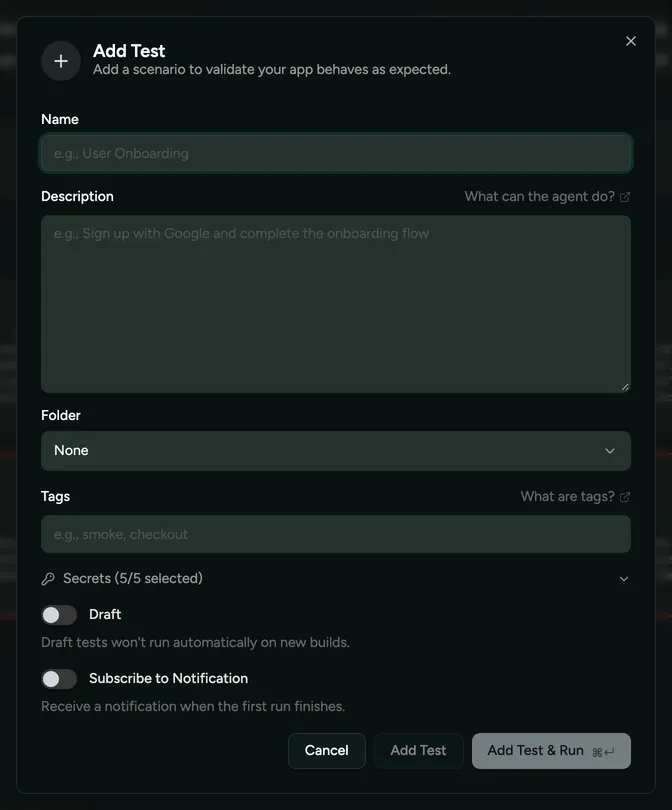
- Draft signals to Semaloop that you’re not ready for this test to be included in the automatic run whenever you push a new build. By default, all tests are active. Trial plans limit how many tests can be active; see Usage and limits.
- Subscribe delivers a notification to you when the first run finishes. This is helpful when creating a test for the first time as you’ll be able to double check if it was a success or failed. The notification will be delivered via Slack notifications.
You can write tests in any language, and your app can be in any language too. To test your app in a different device language or region, say so in the test; see language and region.
Editing a test changes it for future runs, and there’s no version history of a test’s spec, but each previous run shows the spec it ran with. Deleting a test is permanent and can’t be undone, so if you might want it back, make it a draft instead.