

Ask
Ask lets you ask questions about an app’s test results in natural language, rather than clicking through runs to piece the answer together. Open Ask from the sidebar, type a question, and press ⌘ + Enter (Ctrl + Enter on Windows and Linux).
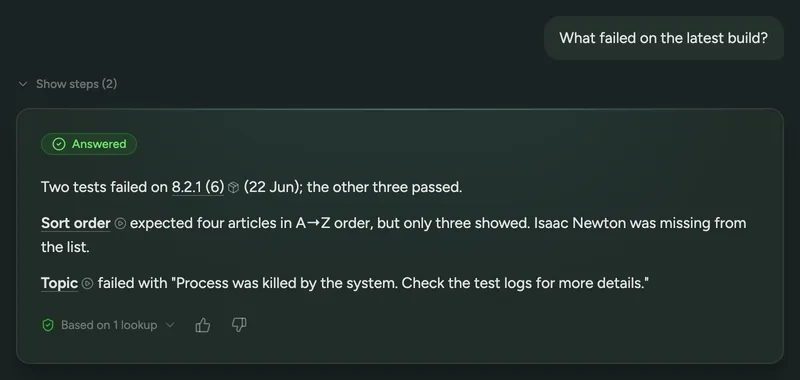
For example:
- What failed on the latest build?
- Which tests are flaky?
- What changed between the last two builds?
- When did this test last pass?
What Ask can answer
Section titled “What Ask can answer”Each question covers the app you’re on: all of its builds, its tests (including drafts) and their current specs, every run including reruns, the device and OS version each ran on, and the root cause analysis for each failure. That makes it good for questions like which tests started failing, whether a failure only happens on one device, or how two builds compare.
Ask can’t see a run’s video, its step-by-step trace, its system logs or its network traffic. For those it points you to the run’s page. It also doesn’t know about your commits, pull requests, code, crash reports or performance figures, so questions about those get “Can’t answer yet”.
Reading an answer
Section titled “Reading an answer”While Ask works, you can watch the steps it takes. Once it’s done, the steps collapse behind Show steps, and the answer appears with links to the runs, builds and tests it mentions. Hover over a link to see what it points to. Based on N lookups lists what Ask looked at to reach its answer.
Each answer is labelled with how it went:
| Label | Meaning |
|---|---|
| Answered | The test results settle the question. |
| Can’t tell | The results exist, but don’t settle it either way. |
| Can’t answer yet | Semaloop doesn’t have the data the question needs. |
| Needs your input | The question could mean more than one thing. See below. |
| Out of scope | The question isn’t about this app’s builds, tests or runs. |
Ask only links to things it actually looked up. If it tries to link to anything else, the link is shown as plain text, and the answer notes how many links were removed.
Follow-up questions
Section titled “Follow-up questions”You can ask follow-up questions in the same conversation, and Ask remembers the last 10 questions. If a question is ambiguous, Ask replies with a short question of its own and a few options. Pick one, or type your own answer.
Click Stop to cancel an answer in progress, or New conversation to start over. Conversations aren’t saved: reloading or leaving the page clears them.
You can also reach Ask from a build summary, on the build page or in Slack, by clicking Ask a follow-up.
Feedback
Section titled “Feedback”Use the thumbs up and down under an answer to tell us whether it was right. A thumbs down asks what was wrong with it; the comment is optional. We use this feedback to improve the answers Ask gives.