

Custom tools
In addition to the core agent capabilities, our agents can execute custom tools that you define within Semaloop. For example, if you have an endpoint to reset a user, that’s a great tool to expose to an agent such that it can use it before it starts an onboarding test.
To create a tool, go to Tools → Add tool.
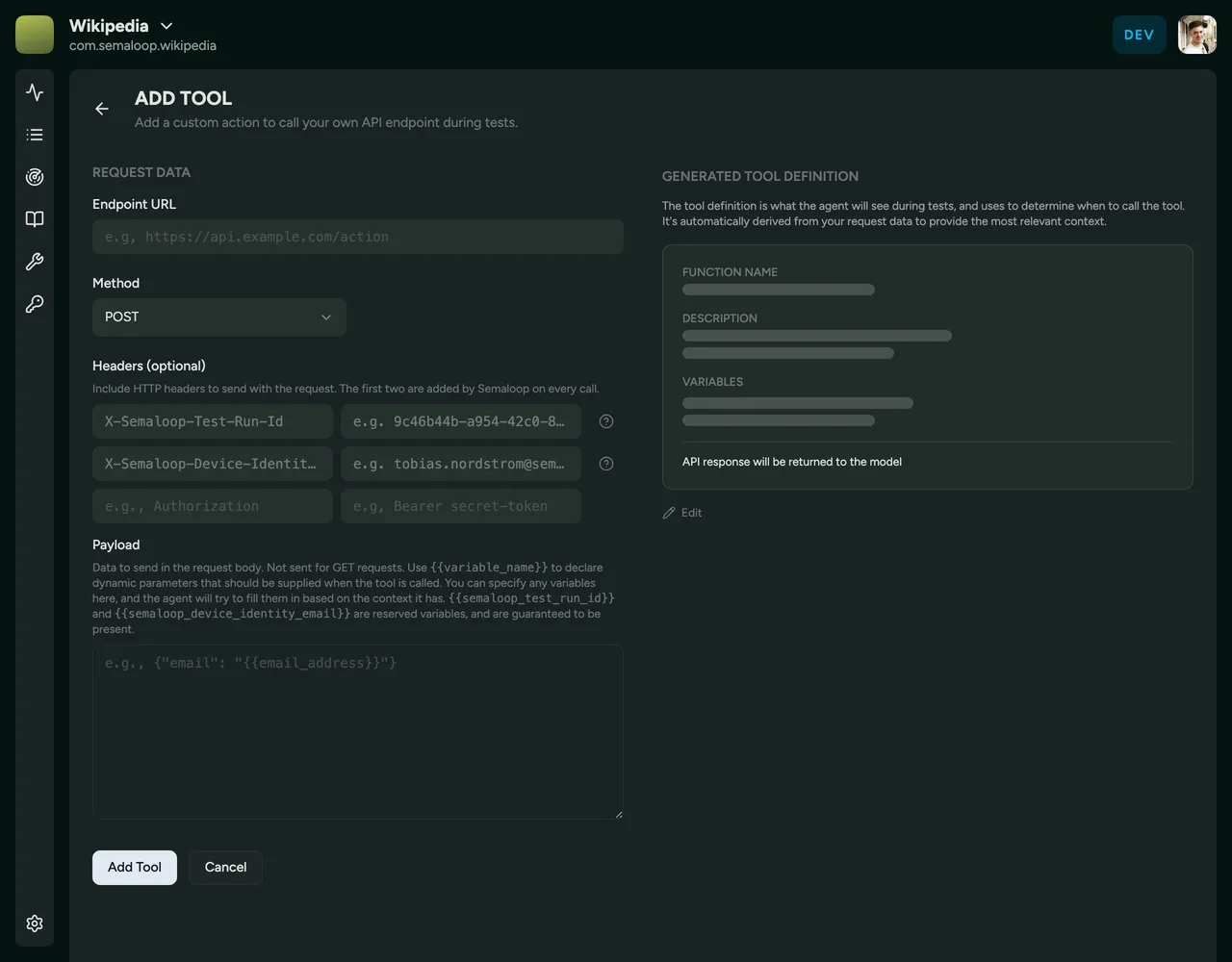
For each tool, you need to define:
- Endpoint URL is the URL for your API endpoint.
- Method is one of GET, POST, PUT, DELETE, or PATCH.
- Headers are optional, but are generally used to add an authorisation token. By default, we pass the test run ID and device email address in the headers so your API can create, identify, and clean up test data consistently throughout a run.
- Payload will be passed to your endpoint when it’s called. It’s possible to also declare a variable here that you’re asking the agent to provide when calling the tool. For example, the mobile number of the device, the email address of the logged in user, and so on.
- Generated Tool Definition allows you to view the tool as it will be given to the agent. If something doesn’t look quite right here, e.g. the description doesn’t quite capture the intent of the tool, you can use a manual adjustment to update the definition.
Here’s an example of how a simple user reset endpoint could be configured:

To use a tool, simply reference it in your test script using the tool’s name:
Reset the account, then complete onboarding
Behind the scenes, our agent will figure out it needs to use the reset user tool, and call that when running the test.